You need speech turned into text and you do not want to pay before you know it works. Fair. Free speech to text software covers a real need — the question is whether it covers yours: a two-minute memo is one thing, a two-hour interview is another. Here is how to get text for free when that is enough, and what to use when it is not.
What free speech to text software does well
Free tools earn their keep on short, simple jobs. A quick memo, a sentence you do not want to type, a brief voice note — for tasks like these, a free converter gets words on the page in seconds, and the price is right. If your recording is short, your voice is the only one in it, and you only need the raw words to copy elsewhere, free is often all you need. Start there. If the tool handles the job, you are done; if it starts to fight you, that is information too — it tells you which limit you hit first.
Where free tools usually run out
The problems appear as recordings grow. Four limits show up again and again, so check them before you commit your time to any tool.
Length comes first. Many free tools cap how much audio you can convert in one go, and long meetings, lectures, and interviews blow past those caps fast. Splitting a recording into pieces and stitching text back together works, but it costs time and it breaks the flow of the conversation.
Speakers come second. A free tool often gives you one undifferentiated block of text. When three people talk in a meeting, working out who said what from that block is slow manual labor.
Structure comes third. Raw text has no paragraphs, no sections, no summary. If you need notes you can study from or send to a colleague, you will be doing that organizing by hand.
Export comes last. Check whether the tool lets you save the result as a document at all, and in which formats, before you spend an hour recording into it.
None of this makes free tools bad — it makes them a specific tool for a specific job. The mismatch, not the tool, is what wastes your evening.
One more limit hides behind the others: accuracy under real conditions. A quiet room and a clear voice are easy for almost every tool. Add crosstalk, a speaker who mumbles, a recording made across a table, and the raw text starts to wobble — wrong words creep in, sentences run together, and cleaning it up takes longer than the recording did. Whatever you choose, test it on five minutes of your actual audio before you trust it with an hour. That five minutes tells you more than any feature list, because it tests your voice, your room, and your microphone rather than a demo made to sound good.
When a recording deserves more than free
The test is simple: if you would re-record the audio when the first attempt fails, free is fine. If you cannot re-create the recording — a one-time interview, a graded lecture, a meeting where decisions were made — you need the full transcript the first time. That means room for long recordings, labels for each speaker, a structure you can skim, and an export that lands in a real document.
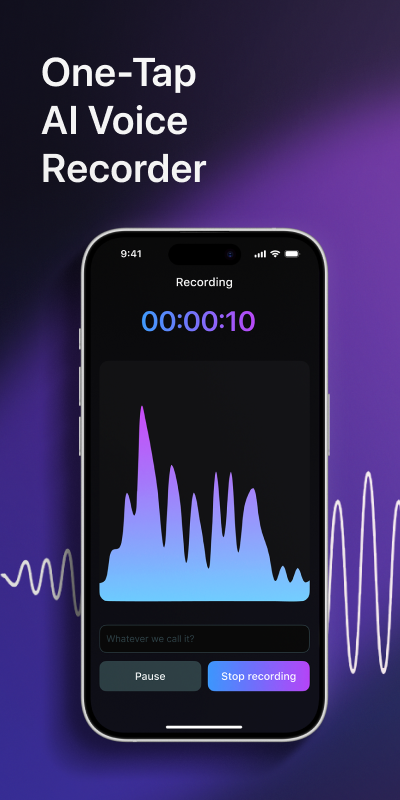
Record the audio in Voxia
Open the app and record your meeting, lecture, or interview. Voxia handles recordings up to 4 hours in a single file, so length stops being the thing you plan around.
Let AI turn speech into text
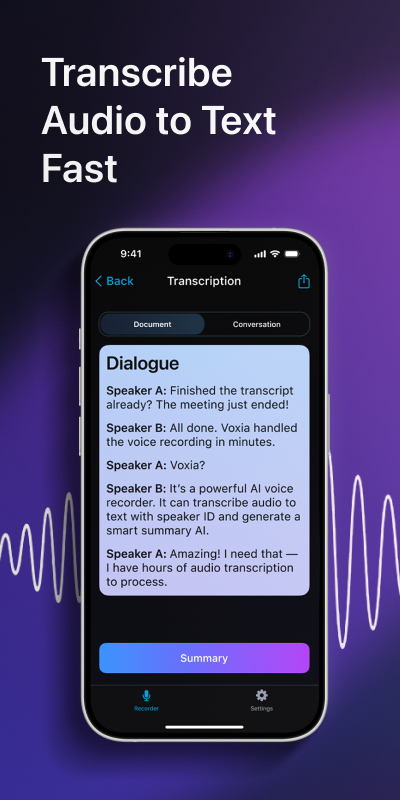
Stop recording and Voxia converts the speech to text, labels each speaker, and lays the conversation out in a clear structure.
Check the summary
Read the AI summary first: it gives you the shape of the conversation before you dive into the full text, and it is ready to share with people who were not there.
Export to Word or PDF
Send the transcript where it needs to live: export to Word or PDF, or share the summary straight from the app.
What the difference looks like
Raw recording
A two-hour interview recorded with a free tool: text split into chunks, no speaker labels, reassembly left to you
With Voxia
- Interviewer
- Walk me through how the decision actually got made.
- Guest
- It started as a side comment in a meeting, honestly
Summary: One AI transcript with speaker labels, a clear structure, and a summary you can send as is
One last angle worth a minute: where your recording lives. Interview audio and meeting talk are private by nature, and a tool that uploads your file somewhere you cannot inspect is asking for trust you may not want to give. Before anything important passes through a free tool, read what it does with the audio, how long it keeps it, and whether you can delete it. The answers belong in the tool's policy pages, not in your hopes.
Questions to ask before you pick a tool
Run any tool through five questions before an important recording. How long a recording does it take in one file? Does it label speakers, or does everything land in one anonymous block? Does it give you a summary, or only raw text? Can you export to Word or PDF, or is the text stuck inside the page? And what happens to the audio you upload — where does it go? If you like the answers, use it with confidence; if one answer bothers you, that is the limit you will hit at the worst moment. For a deeper comparison of free converters and recording apps, read our take on free online voice to text versus an app for long recordings, and our notes on free tools versus Voxia for recordings.
Frequently asked questions
Is there free speech to text software that handles long recordings?
Most free tools cap recording length. Voxia records up to 4 hours per file, which covers lectures, interviews, and full meetings in one go.
Can free tools tell speakers apart?
Free converters usually return one block of text. Voxia labels speech by speaker, so you can tell who said what without reconstructing the conversation.
Can I export a transcript to Word or PDF?
With Voxia, yes — export the finished text to Word or PDF, or share the AI summary on its own.
Is a free tool enough for a one-hour lecture?
For raw words, maybe. If you need speaker labels, structure, and a summary you can study from, a recording app saves you the manual work.
I record on my phone. Does that change the answer?
Not much — the same questions apply. If you record on an iPhone, our audio-to-text guide on this site covers the whole process, voice memos included, and the support page answers app questions.
Free is the right price for a two-minute memo. For the recording you cannot repeat, get the transcript that does the whole job in one pass — get Voxia for iPhone and run your next long recording through it.
Turn your next recording into text with Voxia
Download on the App Store