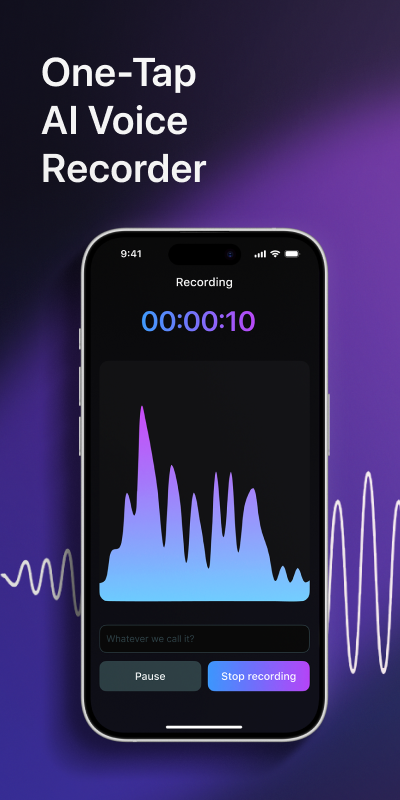
Most lists of the best AI note taking apps rank tools built for video calls: a bot joins the meeting, records it and emails a recap. That works if your whole day happens on screen. It does much less for the conversations that happen in a room: a lecture, a client interview over coffee, a meeting around a table, a long session of thinking out loud on a walk. For those you want an app that records on your phone and turns the audio into readable notes afterwards. That is what Voxia does.
Three kinds of AI note taker
Meeting bots. You connect your calendar, and a bot joins your video calls as a named participant. It records, writes a transcript and sends a summary when the call ends. This suits groups with lots of scheduled calls. The weak spots: everyone sees the bot, some hosts block it, and it can't help with a conversation that has no meeting link.
Desktop recorders without a bot. These capture audio on your computer, so nothing shows up in the call. They suit people who spend the day on a laptop, but they are tied to that laptop and to whatever plays through it.
Recorder apps on your phone. You open the app and press record. The phone sits on the table or in your hand and picks up whatever is said in the room. Afterwards the app produces the transcript, splits it by speaker and writes a summary. This is the only kind that works the same in a lecture hall, an interview and a meeting room. Voxia belongs here.
What we looked at
We read the current top-ranked reviews of AI note takers, including hands-on tests, and took one sourced point for each well-known tool. Every claim in the comparison below sits next to a quote from its source. We did not run our own accuracy test, so there are no scores of ours here. Plans and prices change often, so check them before you subscribe.
These are the questions that matter most when you pick a tool:
- Where does it record? Video calls only, your computer, or anywhere your phone is.
- Does it tell speakers apart? A transcript without speakers is hard to use for interviews and meetings.
- What do you get besides the transcript? Structure and a summary save more time than raw text.
- How long can a recording be? Lectures and workshops can run for hours.
- Can you take the notes elsewhere? Export to common formats matters once notes leave the app.
Voxia: AI notes from any recording
Voxia is an iPhone app that records meetings, lectures and interviews of up to four hours and turns them into notes with AI transcription. It is a recorder, not a bot that joins video calls, so it works the same way wherever you put the phone down.
After each recording you get:
- A transcript labelled by speaker, so you can see who said what.
- Automatic structure, so the text is split into readable sections instead of one long block.
- An AI summary with the main points on top.
- Export to Word and PDF, ready to send or file away.
Here is what that looks like on a short exchange. The example is made up to show the idea:
Raw recording
So, um, about the launch, we said Thursday, but design isn't done, so maybe next week? Yeah, next week works. Should I, um, check with legal? Yes, please, you take that one.
With Voxia
- Speaker 1
- We said Thursday, but design isn't done, so the launch probably moves to next week.
- Speaker 2
- Next week works. I'll check with legal.
Summary: The launch moves from Thursday to next week because design isn't finished. The second speaker will check with legal.
Voxia is a good fit for:
- Students who record lectures and want a summary to revise from instead of an hour of audio.
- Researchers and journalists who record interviews and need each voice labelled.
- Managers and consultants who meet in person and want notes to share afterwards.
- Anyone who thinks out loud and wants a long spoken draft turned into text they can edit.
If most of your meetings are scheduled video calls and you want notes pushed into other work tools automatically, one of the meeting assistants below may suit you better.
Record
Open Voxia and start a recording. Place the iPhone where it can pick up everyone who speaks.
Let it run
Keep recording through the whole meeting, lecture or interview. One recording can last up to four hours.
Get the transcript
When you stop, Voxia turns the audio into structured text with a label for each speaker.
Read the summary
Start with the AI summary to see the main points, then open the full transcript for details.
Export
Export the notes to Word or PDF to share them or file them.
More note takers and what reviewers say
These are the tools that come up most often in current reviews, with one sourced point for each. Most are meeting assistants or note apps with AI features; check how each one records before you choose.
Otter
Its phone app records in-person meetings without needing a meeting link.
“Open it on your phone and it starts recording, with no meeting platform or calendar invite needed.”
Granola
Takes meeting notes from your device without a bot joining the call.
“Granola takes meeting notes quietly from your device and turns them into clean summaries without sending a bot into the call.”
Fireflies.ai
Built around a searchable history of past meetings.
“Fireflies records, transcribes, and stores meetings so teams can search past calls and pull up decisions later.”
Fathom
The free plan includes unlimited recording and transcription.
“Fathom offers unlimited recording and transcription on the free plan.”
tl;dv
On the free plan, AI notes are limited to 10 meetings a month.
“Free plan caps AI notes at 10 meetings a month”
Krisp
A noise suppression tool that added AI notes later.
“Krisp started as a noise suppression tool and added AI note-taking as a natural extension.”
Notion
Strong AI features for collaboration, but complicated and without offline access.
“Notion is a good note-taking app for collaborating and is packed with features, including excellent AI integration, but it's overly complicated and doesn't work offline.”
Mem
Shows related notes in a sidebar without you asking.
“When you create a note, Mem provides context in a sidebar, showing you related information without the need to prompt it first.”
How to choose
Mostly video calls, mostly in a group. A meeting assistant that joins calls makes sense. Check whether your clients mind a visible bot, and whether your company allows one.
Calls on a laptop, and privacy matters. A desktop recorder without a bot keeps the call clean. Make sure it runs on the computer you actually use.
In-person meetings, lectures and interviews. You need a recorder on your phone. Speaker labels matter more here than integrations, because a room full of voices is hard to sort out later. Voxia is built for this case. For a closer look, read our guide to the AI note taker for meetings, lectures and interviews.
On a budget. Most tools have a free plan with limits on minutes, meetings or features. Compare those limits with what you would use in a normal week, and see our comparison of no-cost tools and Voxia for recordings. If you only need a short clip turned into text, read online voice to text vs an app for long recordings.
How to get better AI notes from any app
- Mind the microphone. Most errors come from distance and noise. Put the phone near the people talking, away from fans and open windows.
- Say names early. Introductions help you match speaker labels to real people when you read the transcript.
- Recap decisions out loud. A short "so we agreed..." at the end gives the summary a clear point to pick up.
- Read the summary first. It tells you which parts of the transcript are worth opening.
- Check before you share. AI notes are a strong first draft. Check names, numbers and quotes before they go to a client or into a report.
- Store important notes where your work lives. Export the ones that matter so they sit next to the project, not only inside an app.
Frequently asked questions
What is an AI note taker?
An app that records a conversation, turns the speech into text and uses AI to organize it, usually with a summary. Some join video calls; others, like Voxia, record on your phone.
Does Voxia work for in-person meetings and lectures?
Yes. Voxia records on your iPhone, so it works in a meeting room, a lecture hall or an interview, for up to four hours per recording.
Can Voxia tell who is speaking?
Yes. The transcript is labelled by speaker, so you can follow who said what.
How do I share my notes?
Export them to Word or PDF and send or store the file like any other document.
Start taking AI notes
If your important conversations happen in rooms rather than on video calls, a phone recorder will serve you better than a meeting bot. Install Voxia, capture your next meeting, lecture or interview, and read it back as structured notes with speaker labels and a summary. Questions about the app go to support.
Get notes from your next recording with Voxia
Download on the App Store