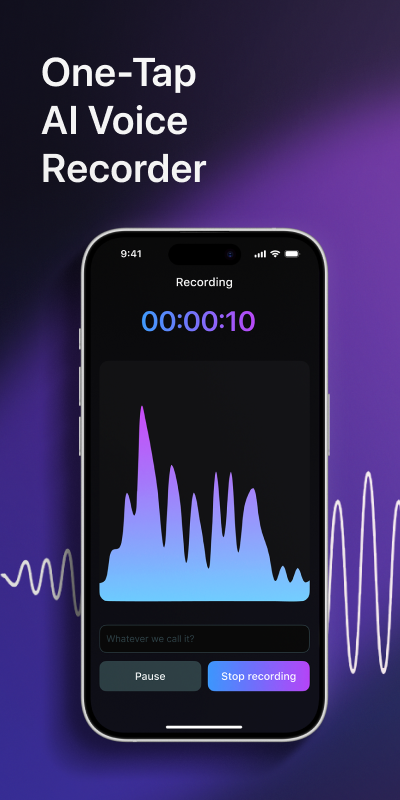
A dictation app turns your speech into text so you don't have to type it. That covers two different jobs, and most lists mix them up. One kind sits in your keyboard and types a sentence while you talk. The other records you for minutes or hours and hands back the full text afterwards. If you are dictating a text message, the first kind is enough. If you are talking through a lecture, an interview or a long brainstorm, you need the second, and that is the job Voxia was built for.
Two kinds of dictation app
Live dictation works inside a text field. You tap a microphone, speak a sentence, and the words appear where the cursor is. It is quick for replies, search queries and short notes. The weak spots show up with length: many tools stop listening after a pause, expect you to say "comma" and "new paragraph" out loud, and have no idea who is speaking when there is more than one voice in the room.
Recorded dictation works the other way around. You record first and read later. You can talk for as long as the session runs, walk around, think out loud, ask someone a question and let them answer. When you stop, the app turns the whole recording into text, splits it into paragraphs and, in the better apps, labels each speaker and writes a summary.
Neither kind wins in general. The right one depends on how long you talk and what you do with the text afterwards.
How we put this list together
We read the current rankings for this search, including hands-on reviews with accuracy tests, and pulled out what they say about the best-known tools. Every claim in the comparison below comes with a quote from one of those reviews. We did not run our own accuracy benchmark, so we don't give scores of our own. Prices and plans change often, so check them before you pay.
We looked at five things:
- Length. Can you talk for an hour, or does the app cut you off?
- Speakers. Does the text show who said what?
- Structure. Do you get paragraphs and a summary, or one long block?
- Export. Can you move the text into a file you will actually share?
- Effort. How much cleanup is left before the text is usable?
Voxia: dictation for long recordings
Voxia is an iPhone app that records meetings, lectures and interviews of up to four hours and turns them into text with AI transcription. It is not a keyboard and does not type into other apps as you speak. It is a recorder that gives you a readable document when you stop.
What you get after a recording:
- The full text of what was said, organized by the app's automatic structure.
- Speaker labels, so a two-person interview reads as a conversation instead of a wall of text.
- An AI summary of the main points, useful when you talked for forty minutes and need the gist in two.
- Export to Word and PDF, so the text goes straight into a report, a draft or an email attachment.
That makes it a good fit for people who think out loud: writers drafting a chapter on a walk, students going back over a lecture, researchers recording interviews, managers talking through a plan after a meeting. If your dictation is mostly short replies, the microphone already on your phone's keyboard will serve you better, and Voxia isn't trying to replace it.
Start a recording
Open Voxia and tap record. Put the phone close to you, or between you and the person you are interviewing.
Talk as long as you need
Speak the way you would to a person. One session can run up to four hours.
Stop and get the text
When you stop, Voxia turns the recording into structured text with a label for each speaker.
Read the summary
Check the AI summary for the main points before you go through the full text.
Export it
Send the result to Word or PDF and edit it there like any other draft.
Other dictation apps and what reviewers say
Below are the tools that come up most often in current reviews, with one sourced point for each. Most of them are live dictation tools; a few are built around recordings.
Wispr Flow
In Wirecutter's tests it reached 98% accuracy and had the cleanest formatting of the apps they tried.
“Wispr Flow turns speech into text that’s 98% accurate, and it has the cleanest formatting of any dictation app we used.”
Microsoft Word Dictate
Accurate, but it only puts text inside Word.
“This tool can output text inside Microsoft Word only.”
Apple Dictation
Comes with Apple's operating systems at no extra cost.
“Included with macOS, iOS, iPadOS, and Apple Watch”
Gboard
Voice typing lives in the mobile keyboard, and reviewers call it fast and reliable.
“Gboard is Google’s keyboard app for mobile, and its voice typing feature is fast and reliable.”
Otter.ai
Built for meetings: it records live, labels speakers and writes summaries.
“It records live, identifies who’s speaking, and creates summaries you can review later.”
Dragon Anywhere
Aimed at professionals, with no limit on how long you dictate.
“You can speak as long as you want and create full documents without limits.”
Speechnotes
Can work offline, but only in part.
“You can dictate offline with Speechnotes, but with limitations.”
Transkriptor
Lets you download finished text in several formats, including PDF and DOC.
“Transcripts can be downloaded in multiple formats, including PDF and DOC, which is extremely handy.”
Which dictation app fits your situation
You reply to messages and write short notes. Use the dictation built into your phone or computer keyboard. It costs nothing, it is already installed, and it handles a sentence at a time well.
You write long documents at a desk. A live dictation tool with punctuation commands and a custom vocabulary is worth trying. Plan to proofread: reviewers point out that tools which tidy your text with AI can sometimes change what you meant to say.
You record lectures, interviews or meetings. You need recorded dictation with speaker labels. Live tools will either stop listening or mix everyone's words together. This is where Voxia fits: record the whole session, then read it back as structured text with a summary on top. Our guide to AI note taking for meetings, lectures and interviews goes deeper into that use.
You think out loud. Some people write best by talking. Long, wandering dictation is hard for live tools, because pauses end the session and false starts land in the text. Recording first lets you talk without watching a screen. You clean up the draft afterwards, with the summary as a map of what you covered.
You are comparing no-cost options. Web tools that cost nothing are fine for short clips. With long files, their limits show up fast. We compared the two approaches in online voice to text vs an app for long recordings and looked at AI note takers side by side with Voxia.
Tips for better dictation results
Whatever app you use, a few habits make the text cleaner:
- Get close to the microphone. Most errors come from distance and room noise, not from the software. For interviews, put the phone between you and the other person.
- Cut background noise where you can. A closed door helps more than any setting.
- Speak in full thoughts. You don't need to talk slowly, but finishing one sentence before starting the next helps both live and recorded dictation.
- Say names clearly the first time. Unusual names and jargon are where any dictation tool is most likely to slip.
- Proofread before you share. Even accurate text needs a read-through. Check numbers, names and anything you plan to quote.
- Keep the recording. With recorded dictation you can go back to the audio when a line looks wrong. With live typing the sound is gone once the words appear.
Frequently asked questions
What is the difference between dictation and transcription?
Dictation usually means speaking so your words become text as you go. Transcription means converting a recording into text afterwards. Voxia does the second: you record, then get the text.
Can Voxia type into other apps while I talk?
No. Voxia is a recorder. It turns your recording into text after you stop, and you can export that text to Word or PDF.
How long can a Voxia recording be?
Up to four hours, which covers most lectures, meetings and interviews in one session.
Does Voxia show who is speaking?
Yes. The text is labelled by speaker, so interviews and meetings read as a conversation.
Getting started
If your dictation runs longer than a few sentences, try recording it instead of typing it live. Install Voxia, record your next lecture, interview or think-out-loud session, and read it back as structured text with speaker labels and a summary. Questions about the app go to support.
Turn your next recording into text with Voxia
Download on the App Store